

Lenovo ThinkPad Thunderbolt 3 Workstation Dock Gen 2, Black
$279.99


Price: $279.99
(as of Jan 05, 2025 13:54:19 UTC – Details)
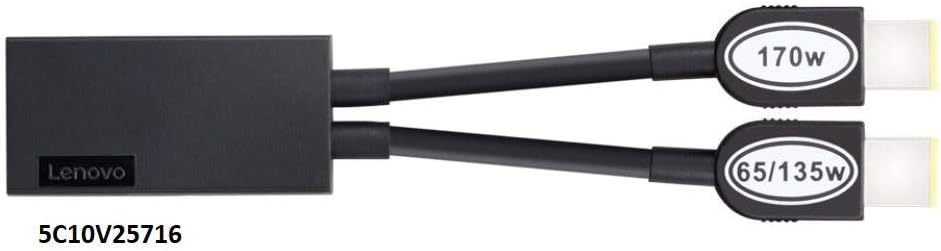
Unlock more ways to be productive with the new generation of workstation dock. The ThinkPad Thunderbolt 3 Workstation Dock Gen 2 turns your ThinkPad Mobile Workstation into a productivity powerhouse, adding support for multi 4K displays, optimized one cable charging, a slew of expansion ports, and advanced network manageability features.Included Accessory :230W Slim type adapter, power cord, Thunderbolt 3 Workstation dock slim tip Y cable and Thunderbolt 3 workstation dock Split cable,warranty and setup poster
Max Number of External Monitors: 3, including TBT Monitor.
Video Ports: 2x DisplayPort, 2x HDMI, 1x Thunderbolt 3 DownStream (video/data).
USB Ports: 5x USB 3. 1 Gen 2 (1 provide always-on mobile device charging).
Item Dimensions: 1. 18 x 8. 66 x 3. 15 inches. Weight: 1. 16 Lbs.
What’s in the Box: ThinkPad Thunderbolt 3 Workstation Dock Gen 2, ThinkPad 230W Power Adapter and Power Cord, Thunderbolt Split Cable (5C10V25713), Slim Tip Y-Cable (5C10V25716), Setup Guide and User Guide.
Connectivity technology: Ethernet
Customers say
Customers appreciate the docking station’s functionality and technology. They say it works well with third-party laptops and Lenovo Thinkpad P1 Gen2. However, some find it too expensive.
AI-generated from the text of customer reviews


Charlie –
Works Great for a P15s
Bought this for my home work area to use with my company-issued P15s Thinkbook. Works perfectly. Power button allows me to wake and sleep the laptop without pulling it out and opening it, which is very nice.
Matt S. –
Powerful docking station
Used this for a home office set-up with 2 monitors, a cooling pad, speakers, microphone, and iphone charger. The power supply that comes with the docking station is able to support the docking station and my laptop. Great technology.
Rosa –
Bad quality + Poor support
Setup: Lenovo thinkpad P15 + Monitor BenQ MOBIUZ EX2510 + Thunderbolt 3 Workstation Dock Gen 2 40AN…Issue #1: BenQ monitor keeps flickering constantly (every 2-3 mins). It is connected through HDMI – I tried both ports and same flickering keeps happening. I checked the Lenovo forums and none of their fixes work (they just recommend to change the resolution). Only “fix” is to connect the external monitor directly to my laptop HDMI port. Which makes the dock useless and now I cannot get a 2nd monitor as planned.Issue #2: Sometimes (this is random) after I click on the “turn on” button, the PC monitor, external monitor, keyboard and mouse “light up”, but nothing else happens. I’ve waited for +5mins and nothing. Not even the Lenovo screen shows up. I have to turn off the computer, unplug the thunderbolt and turn on the computer again. Then, after the computer starts, I have to plug in the thunderbolt. I tried the Lenovo support solution (update firmware and driver) and didn’t work. I also changed the settings of the thunderbolt as depicted in a forum and nothing – same issue keeps happening randomly.I tried to contact Lenovo support chat (as this product has 3 year warranty), but they didn’t provide any idea/fix. When I asked the address to send the device back they disconnected the conversation. I sent an email and tried to call, but there is no reply or menus which hung you up. So the 3 year warranty is useless as well.I won’t recommend this product at all.
MK –
Great Factory Lenovo Docking Station
This factory Lenovo Docking Station arrived quickly and even better than described. Highly recommend and would do business with again. A+ 100%
Joey Mercado –
Too expensive
Way too expensive
Jeff Martin –
Used, but sold as new! But does work as intended.
Fortunately docking station does work, but was clearly not in factory packaging and had some minor surface blemishes such as scratches and dirty spots. Buyer beware. Not happy about paying new prices for used products.
Paul –
Works well; plug-and-play; overpriced
This dock works well with Lenovo Thinkpad P15v Gen 3. There was no setup or troubleshooting needed: Just plug in the peripherals (including a couple of USB3 hubs) and it was good to go. It could benefit from a longer connector cord between the dock and the laptop. It is also overpriced because of the brand name. Unfortunately, it is one of very few solutions out there for laptops that require more than 100W of power so that they can be charged through the dock. This dock is able to charge the portable workstation with 135W or more because it has a double connector and a sufficiently powerful adapter. This requires two connectors from the dock to the workstation, and one of them is the proprietary Lenovo thin connector.
MW –
Rock Solid Lenovo
The item came as described, rock solid Lenovo. Enough ports for every business need. Setup took some doing though – keep in mind USE ALL THE CABLES that come along. You’ll need them all. Works on 3rd part vendor laptops as well.
Canon user –
I was looking for doc station for ThinkPad P1 G2 and checking tons of reference information from Lenovo. Itâs really hard to find the recommended model.This one works for me with two monitors connected.Itâs brand new and there was no problem with shipment.
wpp –
First shipment we received was incorrect(probably the result of the major Christmas rush). But after reaching out to the company via telephone(yes, they answered the telephone number supplied!!!) the replacement order arrived in two days!!!…from Florida to Saskatchewan, CANADA…impressive!!!…but the most impressive aspect is the price…the items we ordered were 2/3 the cost of new parts from two other suppliers…E-Supply Tech is a great business to use for IT hardware!!!…wp in Saskatchewan, CANADA
Maple Leaf –
Great for a triple external monitor setup. Make sure to upgrade firmware and drivers before using.
Philip Brusse –
i love the combined power and data. The last docking station i had to have a power supply for the laptop and a separate one for the docking station. In this dock they are combined which frees up my desk space. It’s a little pricier than i thought i go but now that it’s set up on my desk I’m happy i went with it. Also there are enough powered usb ports that I got rid of my usb hub.