

XPPen Deco Fun L Graphic Drawing Tablets 10×6 Inches Digital Drawing Pad Art Tablet with 8192 Levels of Pressure Battery-Free Stylus for Digital Drawing, Animation, Online Teaching(Black)
$49.99


Price: $49.99
(as of Jan 06, 2025 08:36:06 UTC – Details)
From the brand




Draw with innovative Chip
Our first smart chip X3 Pro, create artistic digitizers that give you a feeling as real and natural as working with a traditional tool.

16K Pressure Levels
Magic Drawing Pad
Artist Pro 16 Gen2 2.5K
Artist Pro 14 Gen2
Deco 640
XPPen Drawing Tablet
XPPen Portable Drawing Tablet
XPPen Accessories
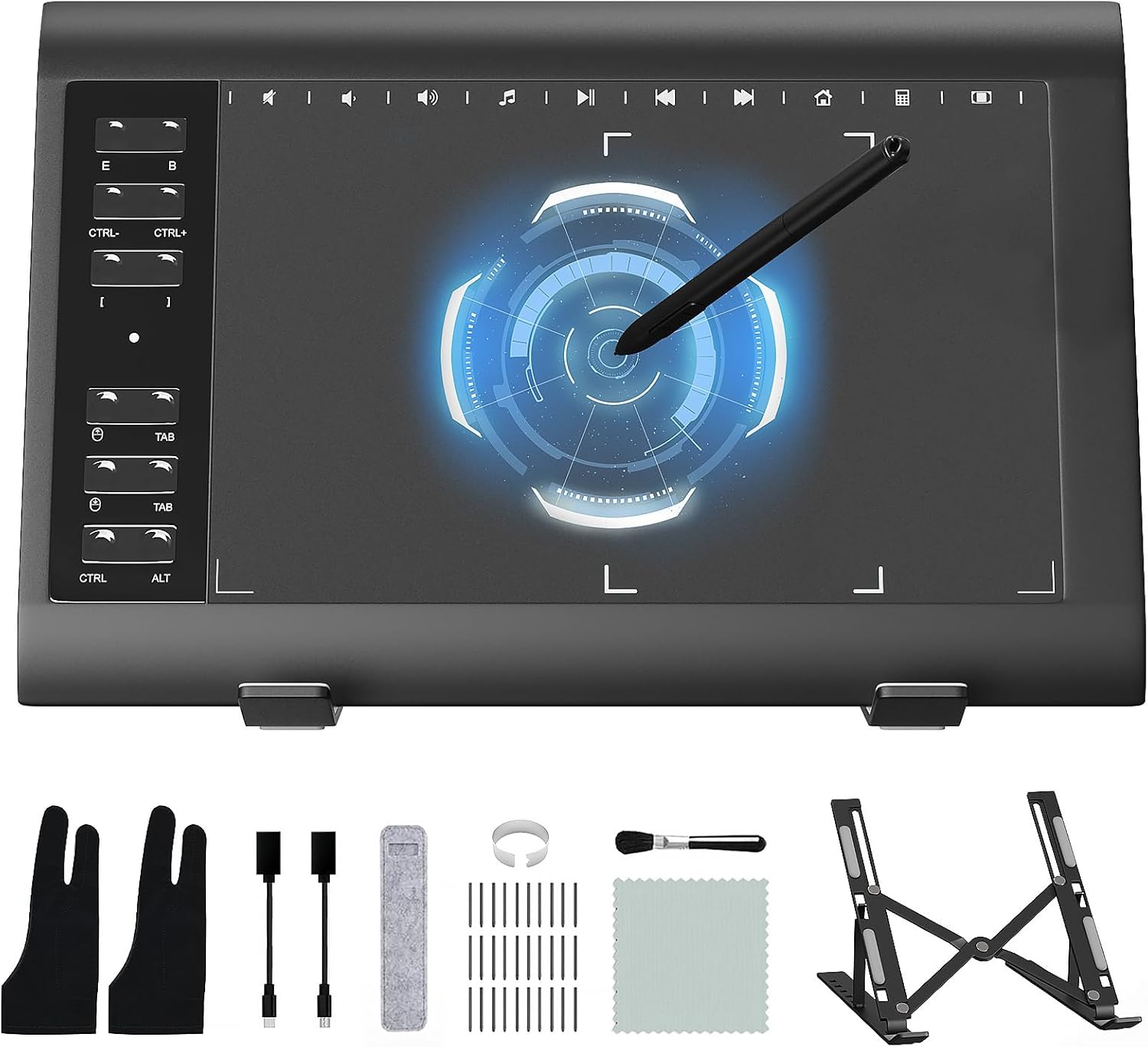
Three size, four colors: Deco fun series are available in three sizes and four colors: classic black, space blue, apple green, and carmine red, to meet your personal preference. Pick your favorite and enjoy Deco fun
Portable but powerful: Active Area 10×6 inches, with the super affordable Deco fun Drawing tablet, you can capture inspiration as it strikes and have your ideas with you at all times
Online Teaching and Working: XPPen Deco fun computer drawing tablet is designed for osu game, digital drawing, painting, sketching, E-signatures, online teaching, remote work, photo editing, it’s compatible with Microsoft Office apps like Word, PowerPoint, OneNote, Zoom, Xsplit etc. Works perfect than a mouse, visually present your handwritten notes, signatures precisely
OSU game: Designed for OSU! gameplay, drawing, painting, sketching, E-signatures etc. No need to install drivers for OSU! It’s also designed for both right and left hand users
Wide CompatibilityXPPen Deco fun graphics tablet is support work with the Windows 7 and above, Mac OS X 10.10 (and higher), Android 6.0 (and higher), Linux (Detailed versions) and Chrome OS 88.0.4324.109 or above
Customers say
Customers find the graphic tablet offers good value for money. They find it easy to use and set up, with simple instructions. The tablet is durable and reliable, though some have issues with the software quality. While most are satisfied with the pen pressure, some have mixed opinions on functionality, drawing area, and drawing ability.
AI-generated from the text of customer reviews
11 reviews for XPPen Deco Fun L Graphic Drawing Tablets 10×6 Inches Digital Drawing Pad Art Tablet with 8192 Levels of Pressure Battery-Free Stylus for Digital Drawing, Animation, Online Teaching(Black)
Add a review
Related Products




$49.99

Jan –
Studying Smarter, Not Harder: My XPPen Deco Fun S Review
As a medical student, taking clear and organized notes is crucial. Enter the XPPen Deco Fun S drawing tablet, my budget-friendly alternative to an iPad. Here’s my honest take:Pros:Portable Powerhouse: This tablet is impressively thin and light, making it a backpack-friendly study companion. It feels surprisingly durable despite its sleek design.Virtual Note-Taking Champ: Ditching paper was a breeze. I use the Goodnotes app to write notes directly on PDFs and slides, keeping everything organized and searchable.Intuitive Software: While downloading the driver is necessary, setup was straightforward. The drawing experience is smooth and responsive, though mastering it takes some practice (especially for newbies).Budget-Conscious Choice: Let’s face it, an iPad can break the bank. This tablet offers great value for its price, making it a fantastic option for students on a budget.Cons:Micro-USB Blues: The Micro-USB connection feels outdated in our Type-C world. Carrying a separate adapter adds unnecessary bulk.Small Drawing Area: The drawing space, while decent, can feel restrictive for detailed note-taking. If you have larger handwriting or prefer bigger canvases, consider sizing up.Overall:The XPPen Deco Fun S is a solid choice for students looking to embrace digital note-taking. It’s portable, affordable, and does the job well. However, the smaller drawing area and Micro-USB connection might leave you wanting more. Weigh your needs and priorities carefully before making a decision.
Mavi Reyes –
budget tablet
This is my first ever tablet. I usually draw on my ipad but wanted to switch up as I want to get familiar with drawing on PC for my career. It’s a pretty good tablet, given that it was on sale for 19 dollars (usually cost around 30$). It doesn’t have any buttons besides the two on the pen, But if you dont use alot of hotkeys, then this tablet should be fine. The sensitivity and pressure of the pen is really good. Makes it feel like I’m drawing with an apple pencilThe size took some adjusting to but then again, this is my first time.Overall, If your a beginner artist that is looking for a tablet that won’t break the bank and is easy to use, this tablet is just right. Even if your not a beginner, this tablet is budget friendly
Leslie –
Excellent Tablet for Price
I needed a replacement for my old Wacom Bamboo so I decided to try this out, and for the most part, I like it. It’s perfect for quick drawing while traveling and set up is fairly simple. The texture is really nice for drawing on and the cable is nice and long to connect easily to the computer.But there are a few small issues that do bug me about this tablet. First, the bar at the top doesn’t do anything, so its a full inch of tablet thats useless.The pen is not duel-tipped, so there’s no eraser end, meaning one of your buttons will need to be programmed as an eraser.There is also an issue with getting it to “pan” instead of scrolling. I was able to get the tablet to pan while I’m in PS after an hour of playing with settings, but online and in other programs, it won’t pan.You also HAVE to have the XP Pen software open anytime you want to use the tablet, so on Macs, it constantly adds another icon to your dock.And any time you plug-in the tablet, the XP Pen settings window pops open over whatever you’re working on. And when you unplug it, the same window pops up saying to “connect your device”. It’s particularly frustrating if you’re in the middle of watching a video or reading something and that dialog box pops up. And customer support says that’s just how the tablet works, so you can’t stop the window from popping open all the time.But even with these issues, it’s still not a bad tablet for the price. I would definitely recommend it as alternative to Wacom, especially if you’re just starting out with drawing tablets.
Saijito –
good size & works great
i’ve mainly done textures for stuff in secondlife and vector artworks using krita with this. i used to have a huion pen tablet and enjoyed it but i wanted a bigger tablet so upgraded to this. my main gripe was there’s no pen holder but i did find a cheap wacom pen holder on aliexpress that solved this problem.the pen pressure is great, and the pen buttons are useful for utilizing krita’s popup palette. I’m ambidextrous so this tablet lacking the hot-key buttons on the left side is actually a plus for me. on my old huion pen tablet, id always hit those buttons accidentally when using my left hand. most pen tablets unfortunately are made for right handed users, not left handed or ambidextrous peopleOf course using one of these pen tablets compared to a screen tablet takes some getting used too, and strengthening of hand-eye coordination but it’s worth it. especially when screen tablets and ipads cost so much more. these pen tablets come with 8000+ levels of pressure for not even a fraction of the cost for a screen tablet.
Yash Ghanekar –
Works Well BUT Not for the Newest Mac models
I specifically purchased this drawing tablet for my MacBook Pro M2, but it doesn’t function with it. The tablet’s description mentioned compatibility with Mac, but if you have one of the latest models or even up to the 2020 model, it likely won’t work because it uses a USB 4-pin connection, which isn’t compatible with Mac. I bought a separate HDMI to USB-C adapter for Mac to connect with the Deco, but it still didn’t work. However, it worked very well with an old Windows laptop that I had. That’s why I rated it 3 stars instead of 1 because the product is indeed very good, from its packaging to its material, the stylus was good too considering its cost, but it just doesn’t work with the latest Mac.
Ryan –
Very good deal
I’ve been using this thing for almost a year now and it’s just what I need. Nothing has broken on this, and I think you need nothing more fancy than this get this if you want to get into art!
milahh c. –
Gostei bastante! Além de linda, comprei na cor tiffany; ela funciona muito bem e é fácil de instalar e utilizar.
Pablo Gutierrez –
Llegó muy rápido y en buenas condiciones, la tableta responde muy bien, al menos en mi caso que es la primera que compro me está resultando muy cómoda y fácil de usar.
M.P. –
I was very happy to find out that the pen, being passive but powered by electromagnetic field from the tablet has great features. It is more than just a physical touch. As you bring the pen near to the tablet, a white spot shows up on your screen so you know where it is going to write, before you touch the screen 🙂 This is my first graphic tablet but I think that plain passive pens wouldn’t have this feature. And it has two buttons on the pen that you can use to select or do different things. Also, the tablet doesn’t respond to your hand resting on the tablet, only to the pen. I guess this is because of the electromagnetic operation. But that is very handy! You don’t need to wear gloves like I saw in some posts about other tablets. Plug and play with no software installation on Windows 10. Construction seems solid. Great value!
Excelente! Dentro do prazo e em perfeito estado. –
Super recomendo! Tudo em ordem!
Leobardo RIVERA –
Como un Ilustrador, te puedo decir que es una de las mejores inversiones de mi vida es lo que necesitaba su presicion me asombro tanto en dispositivo movil como en pc, el unico detalle que encuentro es que no viene con un adaptador para conectarlo al movil y se debe comprar por separado, pero fuera de eso se siente como un dispositivo premium, sin embargo, debes ser cuidadoso al dibujar pues puedes llegar a rayar la superficie con el Stylus, (son detalles esteticos) pero para el dia a dia funciona muy bien es comoda de llevar la conectas al movil y ya te responde viene con Plug and Play me encanto no hay que configurar, lo he provado con Medibang, ArtFlow, Ibis Paint, Sketchbook.